Design AI YouTube Thumbnails That Boost Your Click-Through Rate
Your YouTube thumbnail is your video’s billboard. It is the single most important factor determining whether someone clicks your video or scrolls past it. YouTube’s own creator academy confirms that 90% of top-performing videos use custom thumbnails. Yet most creators either lack design skills, cannot afford to hire a designer for every upload, or spend too much time in Photoshop. AI YouTube thumbnails solve all three problems — generating eye-catching, click-worthy thumbnails in seconds using nothing but a text prompt.
This tutorial teaches you exactly how to create thumbnails that stand out in a crowded feed and drive the clicks your content deserves.
What Makes a YouTube Thumbnail Click-Worthy
Before touching any AI tool, you need to understand the psychology behind thumbnails that get clicked. The most effective YouTube thumbnails share these characteristics:
High contrast: Bold colors that pop against YouTube’s white and dark mode backgrounds.
Clear focal point: One dominant visual element that the eye is drawn to immediately.
Minimal text: Three to five words maximum. The title does the explaining; the thumbnail does the selling.
Curiosity gap: The image suggests something interesting without fully revealing it, compelling the viewer to click.
Readable at small sizes: Thumbnails must work at 168×94 pixels on mobile. If the details disappear at that size, the thumbnail fails.
Step 1: Choose the Right Thumbnail Style for Your Niche
Different YouTube niches have different thumbnail conventions. Viewers develop visual expectations for the types of content they watch, and your thumbnails should meet those expectations while still standing out.
Tech reviews: Clean product shots on solid backgrounds, often with before/after comparisons or bold rating graphics.
Vlogs and lifestyle: Expressive face close-ups with colorful, interesting backgrounds. Authenticity is key.
Education and how-to: Clean graphics with a face or object alongside 2-3 words of text. Clarity over creativity.
Gaming: High-energy compositions with vivid colors, game characters, and dramatic reactions.
Business and finance: Professional headshot or portrait with clean background, bold text overlay with a hook or number.
Step 2: Generate Your Thumbnail Base Image
The foundation of a great AI YouTube thumbnail is a compelling base image. Here is how to create one using AI image generation through Vidzy.
Face-forward reaction thumbnail:
Close-up portrait of a person with an expression of genuine surprise and excitement, mouth slightly open, eyes wide, looking directly at camera, bright studio lighting with colorful gradient background transitioning from electric blue to vibrant purple, high contrast, sharp focus on face, YouTube thumbnail style, 16:9 aspect ratio, bold and eye-catching
Product showcase thumbnail:
A sleek smartphone floating at a dynamic angle against a dark background with colorful light streaks and lens flares, dramatic product lighting with a bright key light creating strong highlights on the glass surface, bold vibrant colors, high contrast, commercial product hero shot, 16:9 aspect ratio, YouTube tech review thumbnail style
Before-and-after thumbnail:
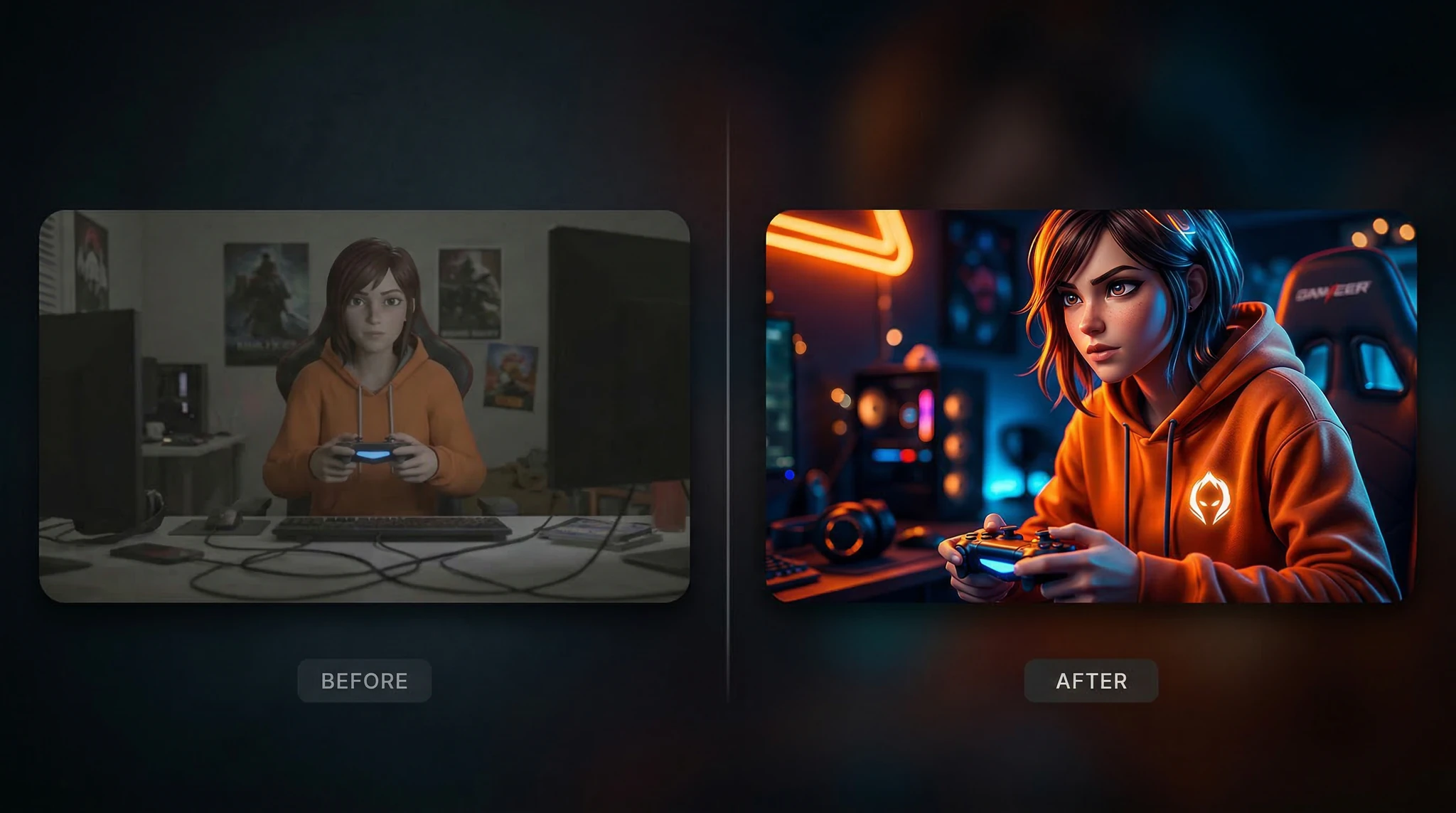
Split image composition with left side showing a dull flat amateur photo and right side showing a vibrant professionally edited version of the same scene, dramatic improvement visible at a glance, bold dividing line in the center, clean layout, 16:9 aspect ratio, transformation thumbnail for YouTube
Food and recipe thumbnail:
Overhead shot of a perfectly golden crispy fried chicken sandwich on a wooden cutting board, melted cheese dripping, fresh lettuce and tomato visible, steam rising, warm directional lighting from the left, rich saturated food photography colors, ultra-appetizing, 16:9 aspect ratio, food YouTube thumbnail style
Step 3: Design for the 16:9 Format
YouTube thumbnails are 1280×720 pixels at a 16:9 aspect ratio. Every element of your thumbnail needs to be designed with this specific format in mind.
Critical composition rules for 16:9 thumbnails:
Place your focal point in the left two-thirds. YouTube overlays the video duration in the bottom-right corner, which can obscure elements placed there.
Leave space for text overlay. If you plan to add text in post-processing, include “negative space on the right side for text overlay” in your prompt.
Keep the subject large. The main element should fill at least 50% of the frame. Small, detailed compositions get lost at thumbnail sizes.
Use horizontal compositions. Vertical elements like standing people should be placed to one side, not centered, to avoid wasted space on either side.
Include “16:9 aspect ratio” and “YouTube thumbnail composition” in every thumbnail prompt to guide the model toward the right format and layout.
Step 4: Master Color Psychology for Thumbnails
Color is the first thing a viewer’s brain processes, before shapes, faces, or text. Using the right colors in your thumbnails can significantly impact your CTR.
Colors that perform well on YouTube:
Red and yellow: High urgency, attention-grabbing. Used by MrBeast, MKBHD, and most top creators.
Blue and teal: Trust and authority. Works well for education, tech, and professional content.
Orange and green: Energy and growth. Popular in fitness, business, and self-improvement niches.
Complementary color pairs: Blue/orange, purple/yellow, red/cyan create visual tension that catches the eye.
Encode these into your prompts: “background color gradient from electric orange to deep red, high saturation, bold contrast.” Be specific about the exact colors you want rather than hoping the model chooses well.
Colors to avoid: Muted pastels, low-contrast palettes, and pure white backgrounds. These are aesthetically pleasing but disappear in a YouTube feed where everything is competing for attention.
Step 5: Create Face-Forward Thumbnails
Thumbnails with human faces consistently outperform those without. The human brain is wired to process faces instantly, making them the most powerful click-driving element in your thumbnail.
Keys to effective face thumbnails:
Expression is everything. A neutral expression is invisible on YouTube. You need exaggerated but genuine emotions. Use these prompt descriptions:
“Expression of shocked disbelief, eyebrows raised high, mouth open”
“Curious confusion, one eyebrow raised, head slightly tilted”
Eye contact with the camera. Direct eye contact creates an immediate psychological connection with the viewer. Include “looking directly at the camera” or “direct eye contact with the viewer” in your prompt.
Tight framing. The face should fill most of the frame. “Extreme close-up from forehead to chin, face filling 70% of the 16:9 frame” gives you the impact you need.
Step 6: Generate Niche-Specific Thumbnails
Here are ready-to-use prompts for popular YouTube niches:
Tutorial/How-to:
Clean composition showing a laptop screen with code or design visible, person’s hands on keyboard, bright modern desk setup, warm key light from the left, teal and orange color palette, clean and professional, slight overhead angle, 16:9 YouTube thumbnail for a coding tutorial, space on right for text overlay
Travel vlog:
Stunning panoramic view of Santorini white and blue architecture with a person standing at the edge of a terrace looking out at the sunset, golden hour warm light, vibrant saturated sky colors, wide angle dramatic perspective, 16:9 YouTube travel thumbnail, cinematic and awe-inspiring, person positioned in left third of frame
Finance and investing:
Professional-looking person in business attire with a confident expression, background showing a large stock market chart with a dramatic green upward trend, dark moody background with green accent lighting, corporate and authoritative mood, 16:9 YouTube finance thumbnail, person in left half, chart in right half
Fitness:
Athletic person mid-exercise showing muscular definition, dynamic pose with movement blur on weights, dramatic gym lighting with harsh overhead spots creating strong shadows, high contrast, intense and energetic, bold red and black color scheme, 16:9 YouTube fitness thumbnail, powerful and motivating
Step 7: Add Text Overlays in Post-Processing
AI-generated images provide your base visual, but most effective YouTube thumbnails include 2-5 words of bold text overlay. This is best done in a separate editing step rather than trying to get the AI to render text.
Text overlay best practices:
Use a bold, sans-serif font. Impact, Montserrat Black, and Bebas Neue are popular choices.
Three to five words maximum. If you need more words, the message is too complicated for a thumbnail.
Add a thick outline or drop shadow so text is readable over any background.
Use a contrasting color. White text with a black outline is readable over virtually any image.
Position text where you planned for it — this is why including “negative space for text” in your AI prompt is critical.
Free tools for adding text to your AI thumbnail: Canva, GIMP, Photopea (browser-based Photoshop alternative), or even PowerPoint in a pinch.
Step 8: A/B Test Your Thumbnails
YouTube now offers built-in thumbnail A/B testing for many creators. Even without this feature, you can test by changing your thumbnail after the initial upload period and comparing CTR in your analytics.
How to test effectively:
Generate 3 distinctly different thumbnail concepts for the same video — different color schemes, different compositions, different expressions.
Upload the first thumbnail when you publish the video.
After 48-72 hours, check your CTR in YouTube Analytics.
If CTR is below your channel average, swap in the next thumbnail variant.
Give each variant at least 48 hours to gather meaningful data.
Because AI generation is fast and inexpensive, you can afford to create multiple variants for every video — something that would be impractical with manual design.
Step 9: Build a Consistent Thumbnail Brand
Viewers should be able to recognize your thumbnails in their feed before reading the title. This means developing a consistent visual brand across your thumbnail portfolio.
Elements to standardize:
Color palette: Pick 2-3 brand colors and use them consistently. Include your exact brand colors in every AI prompt.
Layout template: Face on the left, text on the right (or vice versa). Consistency helps viewers identify your content instantly.
Font and text style: Use the same font, text color, and outline style across all thumbnails.
Background style: Whether you use gradients, solid colors, or blurred backgrounds, keep it consistent within series.
Create a master prompt template that encodes your brand elements: “background gradient from [brand color 1] to [brand color 2], high contrast, [your standard composition], 16:9 YouTube thumbnail, [your brand adjective] style.”
Common YouTube Thumbnail Mistakes
Too much visual clutter. If there are more than 3 distinct elements in your thumbnail, it becomes noisy and confusing at small sizes. Simplify ruthlessly.
Low contrast. Thumbnails that look great on your 27-inch monitor can become an indistinguishable blob on a phone screen. Always check your thumbnail at a small preview size.
Misleading imagery. Clickbait thumbnails might get initial clicks, but they destroy audience retention and trust. Your thumbnail should accurately represent the video content.
Ignoring dark mode. Many YouTube users browse in dark mode. Thumbnails with dark edges can blend into the interface and become invisible. Add a subtle bright border or ensure your key elements have enough contrast against a dark background.
Frequently Asked Questions
What is the ideal YouTube thumbnail size?
1280 x 720 pixels at a 16:9 aspect ratio. YouTube accepts other sizes but 1280×720 is the standard that ensures crisp display across all devices.
Can I use AI-generated faces in my YouTube thumbnails?
Yes, but be aware that viewers expect the person in the thumbnail to appear in the video. If you use an AI-generated face as a stylistic element or illustration, that is fine. Using it to imply a specific real person appears in the video when they do not would be misleading.
How many thumbnail variants should I create per video?
Create at least 3 variants with distinctly different approaches — different colors, compositions, or expressions. AI makes this fast and affordable, so there is no reason not to have options ready.
Should I include text in my AI-generated thumbnail?
Add text as a separate post-processing step rather than asking the AI to render text. Current AI models still struggle with clean, accurate text rendering. Generate the base image with AI, then add text in Canva, Photoshop, or a similar tool.
How often should I update old video thumbnails?
If a video is underperforming its potential (you can see this in YouTube Analytics), swapping the thumbnail is the fastest, lowest-effort way to give it a second chance. Generate a fresh AI thumbnail and test it.
Start Creating Click-Worthy Thumbnails
Your content might be exceptional, but if your thumbnails are not compelling, no one will ever find out. AI YouTube thumbnails give you the ability to produce scroll-stopping visuals for every single video without design skills, expensive software, or hours of manual work.
Open Vidzy, generate a base image using the prompts in this guide, add your text overlay, and upload your new thumbnail. Then watch your analytics and see the difference a professional thumbnail makes. Your next video deserves more clicks — now you have the tools to get them.
Elena Vasquez is a digital marketing consultant specializing in AI-powered content for small businesses. She helps brands leverage AI video and image tools to create professional marketing assets on any budget. She writes about use cases, social media strategies, and practical AI tutorials.
Create Stunning AI Videos from Text Prompts: A Complete Beginner Guide The ability to create AI video from text has transformed from a futuristic concept into an accessible reality. What once required a full production crew — camera operators, lighting technicians, actors, editors — can now be accomplished by typing a description and clicking generate. […]
Design Stunning AI Animated Logos That Elevate Your Brand Identity A static logo communicates your brand. An animated logo performs it. Animated logos, also called logo reveals, motion logos, or logo stings, are short animations that bring your brand mark to life — and they have become essential for modern digital branding. They appear in […]
Transform Any Photo into a Dynamic Video Using AI Image-to-Video You have that perfect photo — a product shot, a landscape, a portrait, a piece of art — and you wish it could come to life. Until recently, animating a still image required motion graphics expertise, expensive software, and hours of frame-by-frame work. Now, AI […]
Elena Vasquez
10 min read
Your Next Video Is 30 Seconds Away
Download Vidzy free, pick a template, and create your first video right now.