Why Aspect Ratios AI Generation Matter More Than You Think
Understanding aspect ratios AI generation is one of the most impactful yet overlooked skills in prompt engineering. The aspect ratio you choose doesn’t just crop your image — it fundamentally changes how AI models compose the scene, distribute visual weight, and allocate detail across the canvas.
Whether you’re creating social media content, cinematic scenes, or product photography, choosing the right aspect ratio before you write a single word of your prompt can be the difference between a stunning result and a mediocre one. This complete guide breaks down every common ratio, when to use each, and how to optimize your prompts for each format.
What Are Aspect Ratios and How Do AI Models Handle Them?
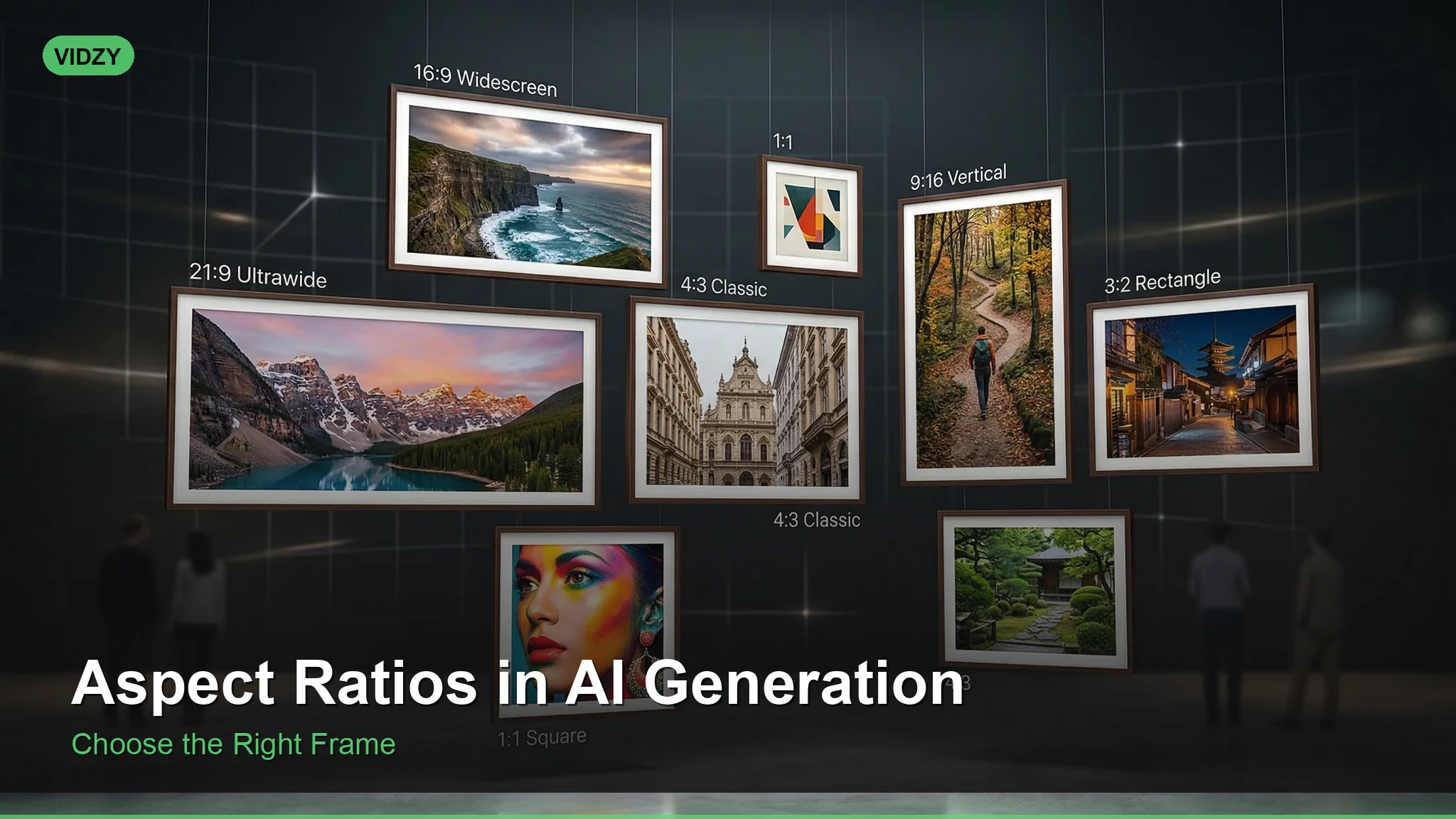
An aspect ratio describes the proportional relationship between an image’s width and height. In AI generation, the ratio tells the model how to structure the composition within a given frame. Most AI image generators default to 1:1 (square), but they support a range of ratios that dramatically affect output quality.
Here’s the critical insight: AI models are trained on datasets where certain compositions appear more frequently at certain ratios. A 16:9 image, for example, draws heavily from cinematic and landscape photography training data. A 9:16 image pulls from mobile-first content. Understanding this connection lets you leverage the model’s strengths.
The Essential Aspect Ratios for AI Generation
1:1 — The Square Format
The default for most AI generators. Square images work best for centered subjects, portraits, product shots, and social media posts (especially Instagram feeds).
Prompt example: “Professional headshot of a confident businesswoman, studio lighting, clean white background, sharp focus, 1:1”
Square compositions naturally center the subject and create symmetrical balance. The AI model excels at filling this frame evenly, making it ideal for isolated subjects.
Best for: Instagram posts, profile pictures, product thumbnails, app icons, centered portraits.
16:9 — Widescreen Cinematic
This is the standard widescreen ratio used in film and television. When you use 16:9, AI models lean into their cinematic training data, producing images with stronger horizon lines, atmospheric depth, and dramatic lighting.
Prompt example: “Vast desert landscape at golden hour, sand dunes stretching to the horizon, dramatic volumetric lighting, cinematic color grading, 16:9”
Best for: YouTube thumbnails, desktop wallpapers, landscape photography, cinematic scenes, blog headers.
9:16 — Vertical / Mobile-First
The inverse of widescreen, 9:16 is optimized for mobile screens. This ratio is essential for anyone creating content for TikTok, Instagram Reels, YouTube Shorts, or Pinterest.
Prompt example: “Fashion model walking down a neon-lit Tokyo street at night, full body shot, rain reflections on pavement, cyberpunk atmosphere, 9:16”
Vertical ratios force the AI to think in terms of height. You’ll get better full-body shots, tall architecture, and vertical environmental storytelling.
Best for: TikTok/Reels/Shorts, Pinterest pins, mobile wallpapers, full-body fashion shots, stories content.
4:3 — Classic Photography
The traditional photography ratio. It’s slightly wider than square, giving more breathing room without the dramatic width of 16:9. This ratio maps closely to how many real-world cameras capture images.
Prompt example: “Cozy coffee shop interior, warm ambient lighting, books and plants on wooden shelves, analog film grain, 4:3”
Best for: Blog images, general photography, real estate interiors, food photography, editorial content.
3:2 — DSLR Standard
The native ratio of most DSLR cameras and 35mm film. When you use 3:2, AI models produce results that feel authentically photographic. It’s wider than 4:3 but less dramatic than 16:9.
Prompt example: “Street photography in rainy Paris, pedestrians with umbrellas, reflections on wet cobblestones, Leica M10 style, 3:2”
Best for: Photography-style compositions, print media, portfolio pieces, editorial spreads.
21:9 — Ultra-Wide Cinematic
The anamorphic widescreen ratio used in blockbuster films. This extreme width creates highly cinematic compositions with pronounced horizontal movement and epic scale.
Prompt example: “Epic sci-fi space battle, massive fleet of ships against a nebula backdrop, lens flares, anamorphic bokeh, ultra-wide 21:9”
Best for: Desktop ultrawide wallpapers, cinematic concept art, panoramic scenes, banner images.
2:3 — Portrait Standard
The vertical version of 3:2, this ratio has been the standard for portrait photography and printed portraits for decades.
Prompt example: “Oil painting portrait of an elderly man, Rembrandt lighting, rich warm tones, detailed brushwork, museum quality, 2:3”
Best for: Portrait photography, book covers, poster designs, character art, fine art prints.
How Aspect Ratio Affects AI Composition
The ratio doesn’t just change the frame — it changes what the AI generates inside it. Here are the composition principles to understand:
Wide ratios (16:9, 21:9) encourage the AI to add environmental context, horizon lines, and atmospheric depth. Subjects tend to be placed using the rule of thirds rather than centered.
Square ratios (1:1) center the subject naturally. The AI allocates more detail to a single focal point and creates symmetrical balance.
Tall ratios (9:16, 2:3) emphasize vertical elements — full bodies, tall buildings, waterfalls, trees. The AI creates more layered foreground-to-background depth in the vertical axis.
Platform-Specific Aspect Ratio Cheat Sheet
Here’s a quick reference for matching ratios to platforms:
Instagram Feed: 1:1 (square) or 4:5 (portrait)
Instagram Stories/Reels: 9:16
TikTok: 9:16
YouTube Thumbnails: 16:9
YouTube Shorts: 9:16
Pinterest: 2:3 or 9:16
Twitter/X Posts: 16:9 or 3:2
LinkedIn: 1.91:1 (close to 16:9)
Facebook: 16:9 or 1:1
Blog Headers: 16:9 or 3:1
Before and After: How Ratio Changes Transform Results
Let’s look at the same prompt rendered at different ratios to see the difference:
Base prompt: “A lone astronaut standing on an alien planet, two moons in the sky, purple atmosphere”
At 1:1: The AI centers the astronaut, creating a balanced, poster-like composition. Both moons are visible but small. Focus is entirely on the figure.
At 16:9: The AI adds sweeping terrain, places the astronaut off-center using rule of thirds, and creates an epic landscape feel. The moons become a more prominent atmospheric element.
At 9:16: The AI emphasizes the astronaut’s full figure from boots to helmet, stacks the two moons vertically, and adds dramatic sky height. It feels like a movie poster.
Same prompt, completely different images — all because of the aspect ratio.
Pro Tips for Aspect Ratio Optimization
Match the ratio to your subject: Landscapes demand width. Portraits demand height. Products need square frames.
Specify the ratio explicitly: Don’t rely on platform defaults. Include the ratio parameter in your prompt or generation settings for predictable results.
Consider your final crop: If you need to crop later, generate at a slightly wider ratio and trim down. This gives you flexibility without losing critical composition elements.
Use Vidzy’s built-in presets: Vidzy offers platform-specific ratio presets so you never have to guess which format to use.
Combine ratio with camera language: Pairing “16:9, wide-angle lens, low angle” is more powerful than the ratio alone. Learn more about composition keywords for AI prompts to level up this skill.
Aspect Ratios for AI Video Generation
Everything above applies to AI video generation as well, but with added considerations. Video platforms are strict about ratios — a 1:1 video on YouTube looks awkward, and a 16:9 video on TikTok wastes screen space.
For AI video tools like Sora, Veo, and Wan, the aspect ratio affects motion composition too. Wide ratios allow for panning shots and horizontal movement. Tall ratios suit vertical reveals and top-to-bottom motion. Explore our free AI tools to experiment with different video formats.
Frequently Asked Questions
What is the best aspect ratio for AI image generation?
There’s no single best ratio — it depends on your use case. For social media posts, 1:1 or 9:16 works best. For cinematic content, 16:9 or 21:9 is ideal. For portraits, use 2:3 or 4:5.
Does aspect ratio affect AI image quality?
Not directly, but it affects composition quality. AI models produce better compositions when the ratio matches the type of content you’re generating, because training data distributions vary by ratio.
Can I change the aspect ratio after generating an image?
You can crop or pad an image to change its ratio, but you’ll lose composition quality. It’s always better to generate at your target ratio from the start. Some tools offer outpainting to extend an image into a new ratio.
What aspect ratio should I use for TikTok and Reels?
Always use 9:16 (1080×1920 pixels). This is the native vertical format for TikTok, Instagram Reels, and YouTube Shorts.
How do I specify aspect ratio in my AI prompt?
Most tools accept ratio parameters in the generation settings. In text prompts, you can include terms like “16:9 widescreen” or “vertical portrait format” to guide the composition even if the tool doesn’t have explicit ratio controls.