Why AI Character Consistency Is the Biggest Challenge in AI Art
Achieving AI character consistency across multiple images is one of the hardest problems in prompt engineering. You can create a stunning character portrait on your first try, but generating that same character again — in a different pose, setting, or scene — often produces someone who looks completely different. Hair color shifts, facial features change, and the character you carefully designed vanishes.
This guide teaches you proven techniques to maintain character consistency across AI-generated images, whether you’re building a brand mascot, creating a comic series, or developing marketing visuals that need a recurring face.
Why AI Models Struggle With Character Consistency
AI image generators create images from scratch each time. Unlike a 3D renderer that uses a fixed character model, AI models interpret your text prompt and generate pixels based on statistical patterns. There’s no persistent “memory” of what your character looks like between generations.
This means that even identical prompts can produce visually different characters due to the randomness (seed variation) built into the generation process. Understanding this limitation is the first step to working around it.
Technique 1: The Detailed Character Sheet Approach
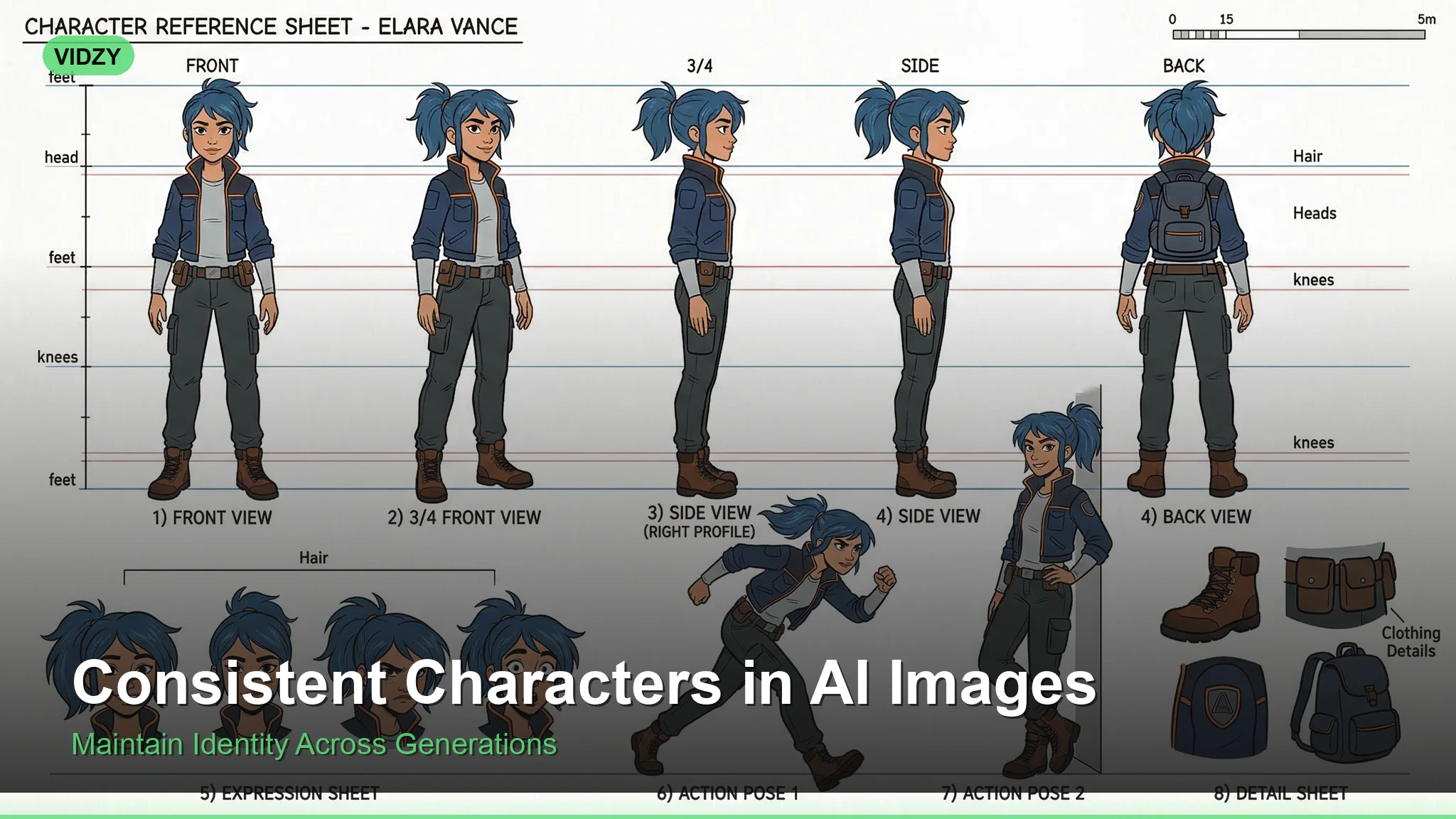
The most reliable method for AI character consistency is creating an exhaustively detailed character description and using it consistently across all prompts.
Weak prompt: “A woman with brown hair in a coffee shop”
Strong prompt: “A 28-year-old woman with shoulder-length chestnut brown hair with subtle auburn highlights, warm olive skin, hazel-green almond-shaped eyes, a small nose with a slight upturn, defined cheekbones, thin arched eyebrows, wearing a cream cable-knit sweater, sitting in a coffee shop”
The key is specificity. Every detail you leave unspecified becomes a variable the AI will randomize. Create a character reference document with these elements:
Facial features: Eye color and shape, nose shape, lip fullness, jawline, cheekbone prominence, skin tone, freckles, scars, or distinctive marks.
Hair: Color (be specific — “chestnut brown” not just “brown”), length, texture, style, part direction.
Body type: Height impression, build, posture.
Signature clothing: Recurring outfit elements that anchor the character visually.
Distinctive features: Glasses, tattoos, jewelry, or accessories that are always present.
Technique 2: Seed Locking
Most AI generation tools allow you to lock the random seed value. When you find a generation you love, note the seed number and reuse it. While seed locking alone won’t guarantee perfect consistency (changing the prompt still changes the output), it significantly reduces variation when combined with a consistent character description.
Prompt with seed strategy: Use your detailed character description as a fixed prefix, change only the scene/action suffix, and keep the same seed value across all generations.
This technique works best for subtle variations — same character in slightly different poses or with minor wardrobe changes.
Technique 3: Reference Image Workflows
The most powerful approach to AI character consistency uses image-to-image or IP-Adapter-style workflows. Instead of describing your character in text alone, you provide a reference image that the AI uses as a visual anchor.
Here’s the workflow:
Step 1: Generate your “hero” character image — the definitive reference. Spend time getting this exactly right.
Step 2: Use that image as a reference input for subsequent generations. Tools like Flux support image references natively.
Step 3: Combine the reference image with your detailed text description for maximum consistency.
Reference workflow prompt: “Same character as reference image — [full character description]. Now shown walking through a rainy city street at night, wearing a dark trench coat over her cream sweater, holding a red umbrella”
Technique 4: Style Anchoring
Maintaining a consistent artistic style across images creates a powerful sense of character consistency even when minor facial variations exist. Human viewers are remarkably forgiving of small feature differences when the overall aesthetic is cohesive.
Anchor your style by including these consistent elements in every prompt:
Art style: “digital illustration,” “oil painting,” “3D render,” “anime cel-shaded” — pick one and stick with it.
Color palette: Describe the same color temperature and palette across all images.
Lighting style: Consistent lighting (e.g., always soft natural light, or always dramatic side lighting) unifies a character series.
Rendering quality: Use the same quality modifiers: “8K detailed,” “photorealistic,” “soft painterly” — consistency here matters.
Technique 5: The Negative Prompt Safety Net
Negative prompts help prevent the AI from drifting away from your character design. Build a negative prompt template that blocks common consistency-breaking elements:
Negative prompt for consistency: “different face, changed features, inconsistent appearance, altered hair color, different eye color, modified facial structure, aged appearance, younger appearance, different skin tone, different body type”
This acts as guardrails that keep the AI from making unwanted creative decisions about your character’s appearance.
Building a Character Consistency Workflow
Here’s a step-by-step workflow that combines all five techniques:
1. Design phase: Write your complete character sheet with every visual detail specified. This is your “character bible.”
2. Hero image: Generate 10-20 variations and select the one that best matches your vision. Lock the seed.
3. Template prompt: Create a prompt template where the character description is fixed and only the scene/action portion changes.
4. Reference pipeline: Use your hero image as a reference for all future generations. Pair it with your text template.
5. Quality control: Compare each new generation against your hero image. Regenerate if consistency drifts too far.
Platform-Specific Tips
Different AI platforms handle character consistency differently:
Flux (via Vidzy): Excellent at maintaining consistency through detailed prompts. Responds well to specific physical descriptions and style anchoring. The model’s strong prompt adherence makes the character sheet approach highly effective.
Midjourney: Use the –sref (style reference) and –cref (character reference) parameters. These were specifically designed for consistency workflows.
Stable Diffusion: LoRA fine-tuning on your specific character provides the strongest consistency. Requires more technical setup but produces the best results for long-running character projects.
DALL-E: Relies heavily on detailed text descriptions. Seed control and the editing feature help maintain consistency across iterations.
Common Mistakes That Break Character Consistency
Being too vague: “A pretty woman” gives the AI total freedom. Specify everything.
Changing art styles: Switching from “photorealistic” to “anime” between images guarantees inconsistency.
Contradicting your description: If your character has “straight black hair,” don’t add “windswept curls” in a later prompt — the AI may change the base hair type.
Ignoring lighting effects on color: Your character’s “chestnut brown hair” will look different under warm sunset light versus cool blue night light. This is natural, not inconsistency.
Overloading scene complexity: Complex backgrounds and multiple characters increase the chance of the AI “forgetting” your character details. Keep scenes focused.
Advanced: Multi-Character Consistency
When you need multiple consistent characters in the same scene, the challenge multiplies. The AI must maintain distinct features for each character simultaneously.
The best approach is to generate each character separately first, establish their individual consistency, and then combine them. Use spatial positioning in your prompts to help the AI keep characters distinct:
“[Character A full description] standing on the left, facing right. [Character B full description] standing on the right, facing left. They are in a modern office, having a conversation over a desk.”
For more on spatial and compositional prompting, check out our guide on composition keywords for AI prompts.
Frequently Asked Questions
Can AI generate the exact same character every time?
Not perfectly with text-to-image alone. However, combining detailed descriptions, seed locking, and reference images can achieve 90-95% consistency, which is sufficient for most professional use cases.
What’s the best AI tool for character consistency?
Tools that support image references (like Flux and Midjourney’s –cref) provide the strongest consistency. Advanced prompt techniques can also help maintain character features across generations.
How many details should I include in a character description?
As many as possible — at minimum, specify hair (color, length, style), eyes (color, shape), skin tone, face shape, age range, build, and one signature outfit element. More detail means less randomness.
Does AI character consistency work for video generation?
Video models maintain consistency within a single clip because they generate frames sequentially. Cross-clip consistency follows the same principles as images — use detailed descriptions and reference frames.
Can I train an AI on my character for perfect consistency?
Yes. Fine-tuning (LoRA training in Stable Diffusion, or custom models in other platforms) trains the AI on your specific character. This is the gold standard for consistency but requires technical knowledge and multiple reference images.