

Travel Poster
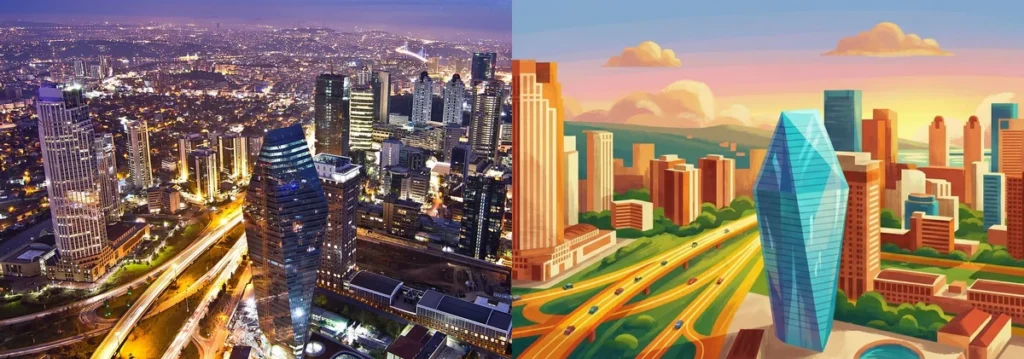
Prompt
{
"style_definition": {
"art_style": "Modern Flat Vector Illustration",
"medium": "Digital Vector Art",
"vibe": "Optimistic, Cheerful, Travel Poster",
"rendering_engine_simulation": "Adobe Illustrator / Vectorized"
},
"visual_parameters": {
"lines_and_shapes": "Clean sharp lines, simplified geometry, lack of complex textures, rounded organic shapes for trees and clouds.",
"colors": "High saturation, vibrant palette. Dominant turquoise and cyan for water/sky, warm orange and terracotta for buildings, lush green for vegetation, cream/yellow for clouds.",
"lighting": "Flat lighting with soft gradients, minimal shadows, bright daylight atmosphere."
},
"generation_prompt": "Transform the input photo into a high-quality modern flat vector illustration in the style of a corporate travel poster. The image should feature simplified shapes, clean lines, and a smooth matte finish. Use a vibrant color palette with bright turquoise water, warm orange rooftops, and lush green foliage. The sky should be bright blue with stylized fluffy clouds. Remove all photorealistic textures, noise, and grain. Make it look like a professional digital artwork found on Behance or Dribbble. Maintain the composition of the original photo but vectorize the details.",
"negative_prompt": "photorealistic, realistic, 3d render, glossy, shiny, grainy, noise, blur, bokeh, detailed textures, grunge, dark, gloomy, sketch, rough lines, low resolution, photography"
}
How to Use This AI Image Prompt
- Click Copy Prompt above to copy the full prompt text
- Open your preferred AI image generator
- Paste the prompt and adjust any variables to your needs
- Generate and iterate — try modifying keywords for different results
Or use Vidzy to generate AI images with one tap — no prompt editing needed. Download free on the App Store.
Tips for Better AI Image Results
- Be specific: Add details about lighting, camera angle, style, and mood for more accurate AI output.
- Iterate: Generate multiple versions and pick the best one. Small wording changes can produce very different results.
- Combine ideas: Mix elements from different prompts in our free prompt library to create unique compositions.
- Match the model: Different AI models interpret prompts differently. Try the same prompt across multiple tools to compare results.
Frequently Asked Questions
Can I modify this prompt?
Absolutely. This prompt is a starting point. Feel free to change subjects, styles, lighting, or any other details to match your creative vision.
What AI tool works best with this prompt?
This prompt works with most AI image generators including Flux, Nano Banana 2, Midjourney, and DALL-E.
Is this prompt free to use?
Yes, all prompts in the Vidzy library are free to copy and use for personal and commercial projects.

Your Next Video Is 30 Seconds Away
Download Vidzy free, pick a template, and create your first video right now.
