

The Witcher – Double Exposure Effect
Prompt
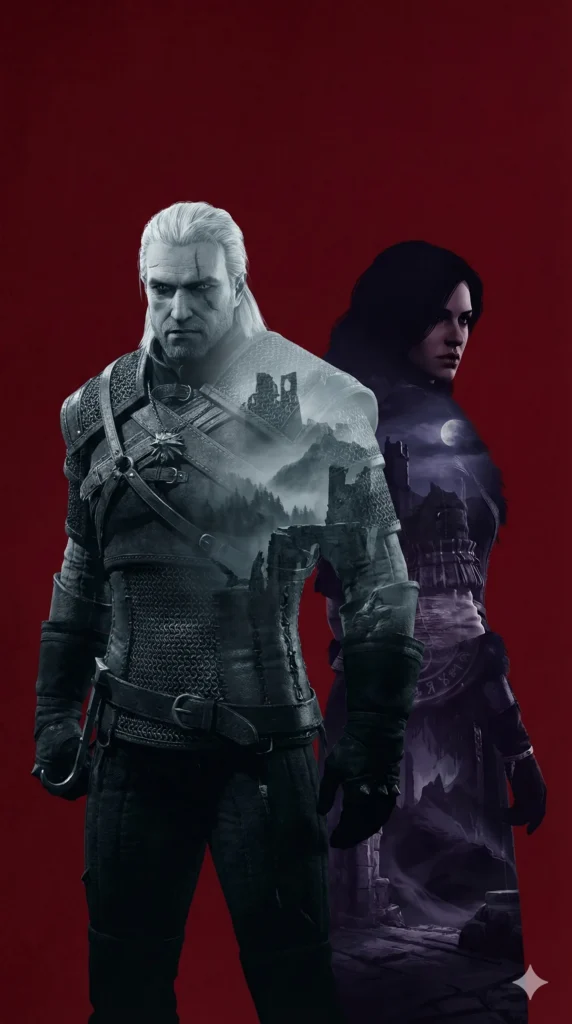
Double exposure cinematic wallpaper inspired by The Witcher video game series (game, not TV show).
Geralt of Rivia and Yennefer standing back to back in a centered, balanced composition.
Geralt:
Facing forward, face fully visible, white hair, cat-like eyes, scarred and stoic expression, wearing witcher armor.
Strong, defined silhouette.
Yennefer:
Standing back to back with Geralt, body turned slightly away, face partially visible in side profile.
Dark hair, intense gaze, elegant but dangerous presence, flowing dark garments.
Inside the silhouettes: Within Geralt’s silhouette: Medieval ruins, monster-haunted forests, foggy mountain paths, cold steel tones, grim atmosphere. Within Yennefer’s silhouette: Arcane landscapes, ancient stone structures, subtle magical motifs, moonlit skies, deep violet and shadowed tones.
Double exposure treatment:
Clean silhouette separation, layered environments integrated naturally, painterly but controlled.
No scenery outside the silhouettes.
Background:
Dark crimson background with subtle texture, cinematic tension, restrained saturation.
Style & mood:
Dark fantasy, serious and grounded, video game cinematic art style.
No Netflix, no modern costume design, no TV adaptation influence.
Ultra high resolution, sharp details, premium wallpaper quality. Format 9:16
How to Use This AI Image Prompt
- Click Copy Prompt above to copy the full prompt text
- Open your preferred AI image generator (Nano Banana 2 recommended)
- Paste the prompt and adjust any variables to your needs
- Generate and iterate — try modifying keywords for different results
Or use Vidzy to generate AI images with one tap — no prompt editing needed. Download free on the App Store.
Tips for Better AI Image Results
- Be specific: Add details about lighting, camera angle, style, and mood for more accurate AI output.
- Iterate: Generate multiple versions and pick the best one. Small wording changes can produce very different results.
- Combine ideas: Mix elements from different prompts in our free prompt library to create unique compositions.
- Match the model: Different AI models interpret prompts differently. This prompt is optimized for Nano Banana 2.
Frequently Asked Questions
Can I modify this prompt?
Absolutely. This prompt is a starting point. Feel free to change subjects, styles, lighting, or any other details to match your creative vision.
What AI tool works best with this prompt?
This prompt is optimized for Nano Banana 2, but it works well with most modern AI IMAGE generators.
Is this prompt free to use?
Yes, all prompts in the Vidzy library are free to copy and use for personal and commercial projects.

Your Next Video Is 30 Seconds Away
Download Vidzy free, pick a template, and create your first video right now.
