

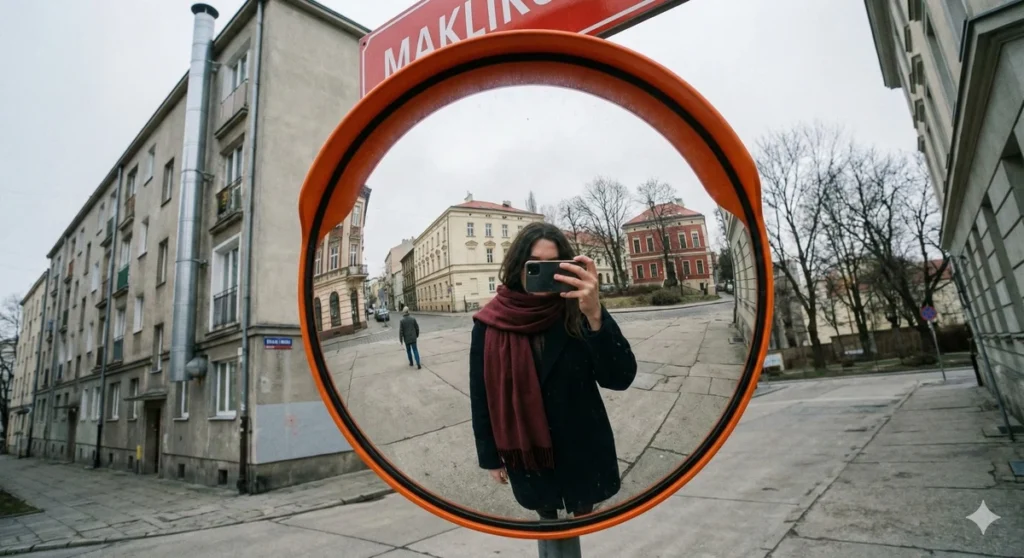
Reflected Self-Portrait in an Urban Convex Traffic Mirror
Prompt
{
"image_analysis": {
"environment": {
"type": "Outdoor",
"setting": "Urban street scene",
"weather": "Overcast/Cloudy"
},
"technical_specs": {
"camera_lens": "Wide-angle (likely smartphone rear camera)",
"camera_angle": "Low angle, looking upwards towards a traffic mirror and street sign",
"focus": "Sharp focus on the convex mirror and the immediate foreground, slight distortion due to wide lens and mirror curvature"
},
"lighting": [
{
"source_id": 1,
"type": "Natural Ambient Light (Overcast Sky)",
"angle": "Overhead/Diffused",
"color": "Cool White / Greyish",
"intensity": "Moderate",
"effect_on_objects": "Creates flat lighting with soft, undefined shadows; minimal contrast on building facades; creates a glare on the upper curve of the convex mirror."
}
],
"people": [
{
"id": "person_1_photographer",
"location": "Visible inside the reflection of the convex mirror",
"identity_status": "Anonymized (Face obscured by phone)",
"orientation": {
"body_direction": "Facing forward (towards the mirror)",
"face_direction": "Facing forward (towards the mirror/phone)"
},
"emotional_state": "Indeterminable (Face obscured)",
"posture": {
"general_definition": "Standing upright",
"feet_position": "Not visible (cropped in reflection)",
"hand_position": "Raised to face level, holding a smartphone to take the photo",
"visibility_extent": "Visible from mid-thigh/knees up to head in the reflection"
},
"head_details": {
"hair": {
"color": "Dark (Black or Dark Brown)",
"style": "Long, loose",
"shape": "Falls over shoulders"
},
"ears": "Covered by hair",
"face_features": {
"forehead": "Obscured by phone/hair",
"eyes": "Obscured by phone",
"nose": "Obscured by phone",
"mouth": "Obscured by phone",
"chin": "Partially visible below phone, fair skin tone"
},
"facial_hair": "None"
},
"body_details": {
"body_type": "Average/Slender (hard to determine due to heavy clothing)",
"skin_tone": "Light/Fair (visible on hands/face)",
"neck": "Covered by scarf",
"shoulders": "covered by coat, relaxed",
"chest": {
"ratio_to_body": "Indeterminable (covered by thick coat)",
"measurements": "Indeterminable",
"bra_status": "Indeterminable",
"nipple_visibility": "Not visible",
"size_appearance": "Indeterminable due to winter clothing"
},
"abdomen": {
"ratio_to_body": "Concealed by coat",
"ratio_to_chest": "Indeterminable",
"ratio_to_hips": "Indeterminable"
},
"hips": {
"ratio_to_body": "Concealed by coat",
"measurement_estimation": "Indeterminable"
},
"legs": {
"visibility": "Partially visible (upper thighs)",
"clothing": "Dark trousers/tights"
}
},
"clothing": {
"upper_body": "Dark (black or navy) overcoat, maroon/dark red scarf wrapped loosely",
"lower_body": "Dark trousers or leggings (partially visible)",
"light_interaction": "Fabric absorbs light, appearing matte",
"accessories": "Smartphone (held in hands)",
"footwear": "Not visible"
}
},
{
"id": "person_2_pedestrian",
"location": "Visible inside the reflection of the convex mirror (background)",
"identity_status": "Anonymized (Back turned)",
"orientation": {
"body_direction": "Walking away from the camera",
"face_direction": "Forward (away from camera)"
},
"posture": {
"general_definition": "Walking",
"visibility_extent": "Full body visible in distance"
},
"clothing": {
"upper_body": "Dark coat",
"lower_body": "Dark trousers"
}
}
],
"objects": [
{
"name": "Convex Traffic Mirror",
"purpose": "Traffic safety/Visibility for blind corners",
"contribution_to_scene": "Acts as the focal point and frame for the self-portrait reflection",
"proportions": "Dominates the center foreground",
"color": "Orange (rim), Reflective silver (surface)",
"location": "Center of the image"
},
{
"name": "Street Sign",
"purpose": "Navigation/Location identifier",
"text_content": "MAKLIK (Partial visibility)",
"color": "Red background with white text",
"location": "Attached to the pole above the mirror"
},
{
"name": "Apartment Building (Left)",
"purpose": "Residential/Commercial",
"proportions": "Large, multi-story structure",
"color": "Grey and white facade",
"features": "Balconies with white railings, tall metal chimney/vent pipe attached to side",
"location": "Left side foreground"
},
{
"name": "Wooden Building (Background Left)",
"purpose": "Residential/Historic",
"color": "Faded Red/Pink",
"location": "Visible in the background behind the mirror",
"features": "Traditional architecture, wooden siding"
},
{
"name": "White Building (In Reflection)",
"purpose": "Public/Institutional",
"color": "Cream/White",
"location": "Reflected in the mirror",
"features": "Arched windows, historic style"
},
{
"name": "Trees/Vegetation",
"purpose": "Environment",
"color": "Dark Green/Brownish (Autumnal)",
"location": "Right side and background"
}
],
"negative_prompt": "bright sunshine, blue sky, direct flash, nudity, summer clothing, high contrast, studio lighting, macro lens, detailed face view, clear text, modern glass skyscraper, noise, grain, watermark"
}
}
How to Use This AI Image Prompt
- Click Copy Prompt above to copy the full prompt text
- Open your preferred AI image generator
- Paste the prompt and adjust any variables to your needs
- Generate and iterate — try modifying keywords for different results
Or use Vidzy to generate AI images with one tap — no prompt editing needed. Download free on the App Store.
Tips for Better AI Image Results
- Be specific: Add details about lighting, camera angle, style, and mood for more accurate AI output.
- Iterate: Generate multiple versions and pick the best one. Small wording changes can produce very different results.
- Combine ideas: Mix elements from different prompts in our free prompt library to create unique compositions.
- Match the model: Different AI models interpret prompts differently. Try the same prompt across multiple tools to compare results.
Frequently Asked Questions
Can I modify this prompt?
Absolutely. This prompt is a starting point. Feel free to change subjects, styles, lighting, or any other details to match your creative vision.
What AI tool works best with this prompt?
This prompt works with most AI image generators including Flux, Nano Banana 2, Midjourney, and DALL-E.
Is this prompt free to use?
Yes, all prompts in the Vidzy library are free to copy and use for personal and commercial projects.

Your Next Video Is 30 Seconds Away
Download Vidzy free, pick a template, and create your first video right now.
