

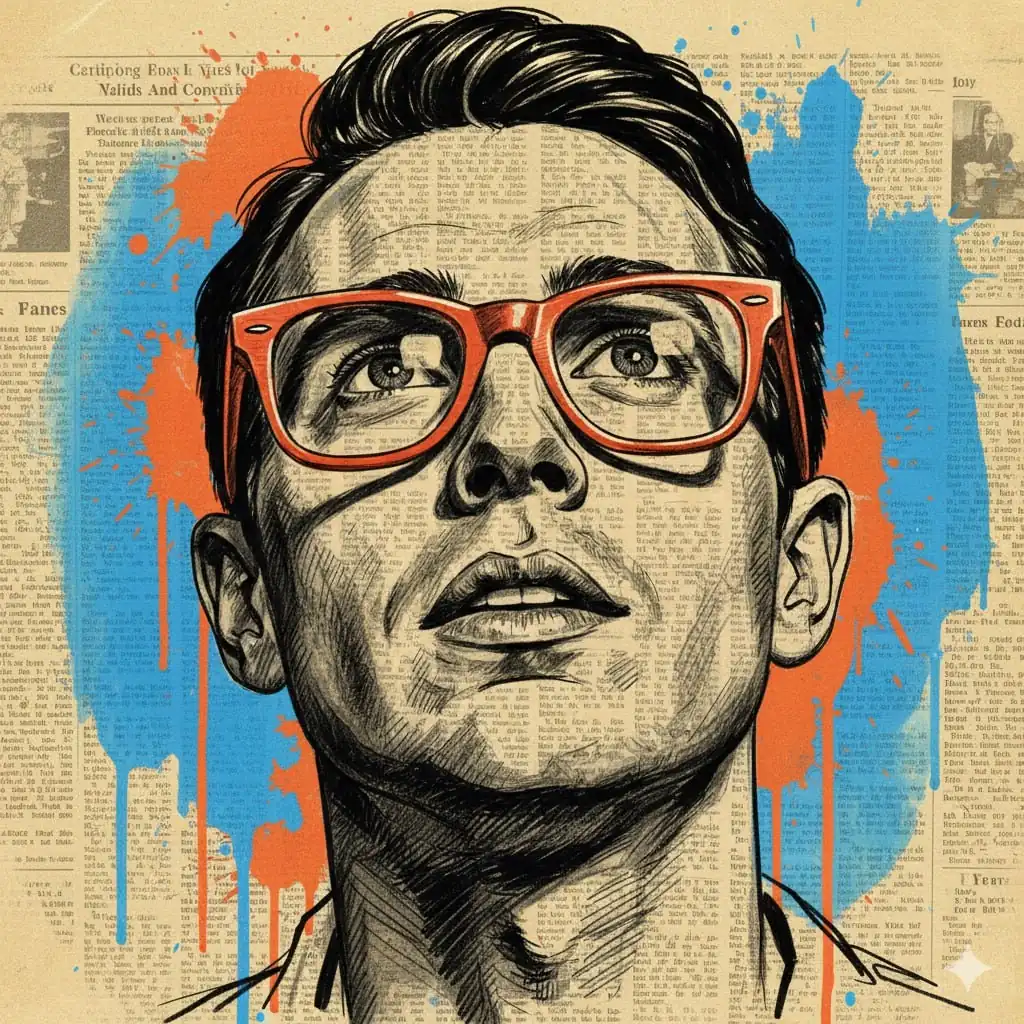
Mixed Media Portrait Illustration
Prompt
{
"subject": {
"description": "A portrait of a man with short, dark, textured hair, looking slightly upward. He wears thick-framed, vibrant orange glasses. The face is rendered with black ink-style cross-hatching directly over a newspaper background.",
"count": 1,
"orientation": "front-facing",
"pose_or_state": "static, head tilted slightly up",
"expression": "neutral, contemplative"
},
"scale_and_proportion": {
"subject_to_frame_ratio": "Subject occupies ~75% of the frame height",
"proportions": "locked to reference",
"negative_space": "Moderate, occupied by paint splatters and newspaper text"
},
"composition": {
"shot_type": "close-up portrait",
"camera_angle": "eye-level, looking slightly up",
"framing": "centered",
"symmetry": "Face is centered and mostly symmetrical; background splatters are asymmetrical",
"background": "Aged, yellowed vintage newspaper with columns of text and small faded images, layered with large blue and orange paint splatters and drips",
"depth_of_field": "flat (2D mixed media style)"
},
"temporal_context": {
"era": "Contemporary mixed media art with mid-century vintage newspaper and glasses style",
"modern_elements": false,
"retro_stylization": true,
"trend_influence": false
},
"style": {
"visual_type": "Mixed media illustration",
"realism_level": "maximum for the specified art style",
"art_style": "Pen and ink sketch over newspaper collage",
"stylization": "Literal reproduction of the specific mixed media style",
"interpretation": "literal reproduction only"
},
"lighting": {
"setup_type": "Simulated in the sketch",
"light_direction": "Frontal/top-down, defined by shadows under the jaw, nose, and brow",
"light_quality": "High contrast rendering",
"contrast": "high (black ink against light paper)",
"shadow_behavior": "rendered through hatching and solid black areas",
"color_temperature": "warm overall due to paper, with cool blue accents",
"lighting_variation": "none"
},
"materials": {
"primary_materials": [
"yellowed vintage newspaper",
"black ink / charcoal",
"vibrant blue and orange paint (acrylic or spray paint look)"
],
"surface_finish": "matte paper and ink",
"light_reflection": "minimal, only visible as highlights on the glasses frames and in the pupils",
"material_accuracy": "exact"
},
"color_palette": {
"dominant_colors": [
"Sepia/Cream (newspaper)",
"Black (ink lines)",
"Vibrant Orange (glasses and splatters)",
"Bright Blue (splatters)"
],
"saturation": "High in orange and blue; low/natural in the newspaper background",
"contrast_level": "High (chromatic and tonal contrast)",
"color_shift": false
},
"texture_and_detail": {
"surface_detail": "Fine newsprint texture, visible ink lines, paint drip edges",
"grain_noise": "paper grain texture preserved",
"micro_details": "Text on newspaper remains visible through the facial features",
"sharpness": "sharp ink lines and crisp paint edges"
},
"camera_render_settings": {
"lens_equivalent": "50mm look",
"perspective_distortion": "none",
"aperture_look": "N/A (flat illustration)",
"resolution": "high",
"render_quality": "clean, no digital compression artifacts"
},
"constraints": {
"no_additional_objects": true,
"no_reframing": true,
"no_crop": true,
"no_stylization": true,
"no_artistic_license": true,
"no_text": false,
"no_watermark": true,
"no_effects": true,
"no_dramatic_lighting": true,
"no_color_grading": true
},
"iteration_instruction": {
"compare_to_reference": true,
"fix_geometry_first": true,
"then_fix_composition": true,
"then_fix_lighting": true,
"then_fix_color": true,
"ignore_aesthetic_improvements": true
},
"negative_prompt": [
"creative",
"cinematic",
"artistic",
"stylized",
"illustration (different from reference)",
"abstract",
"dramatic",
"wide-angle",
"fisheye",
"exaggeration",
"reinterpretation",
"extra elements",
"modernized",
"retro look (different from reference)",
"color grading",
"AI artifacts",
"blur",
"depth of field"
]
}
How to Use This AI Image Prompt
- Click Copy Prompt above to copy the full prompt text
- Open your preferred AI image generator
- Paste the prompt and adjust any variables to your needs
- Generate and iterate — try modifying keywords for different results
Or use Vidzy to generate AI images with one tap — no prompt editing needed. Download free on the App Store.
Tips for Better AI Image Results
- Be specific: Add details about lighting, camera angle, style, and mood for more accurate AI output.
- Iterate: Generate multiple versions and pick the best one. Small wording changes can produce very different results.
- Combine ideas: Mix elements from different prompts in our free prompt library to create unique compositions.
- Match the model: Different AI models interpret prompts differently. Try the same prompt across multiple tools to compare results.
Frequently Asked Questions
Can I modify this prompt?
Absolutely. This prompt is a starting point. Feel free to change subjects, styles, lighting, or any other details to match your creative vision.
What AI tool works best with this prompt?
This prompt works with most AI image generators including Flux, Nano Banana 2, Midjourney, and DALL-E.
Is this prompt free to use?
Yes, all prompts in the Vidzy library are free to copy and use for personal and commercial projects.

Your Next Video Is 30 Seconds Away
Download Vidzy free, pick a template, and create your first video right now.
