

Minimalist Editorial Beauty Analysis with European Model
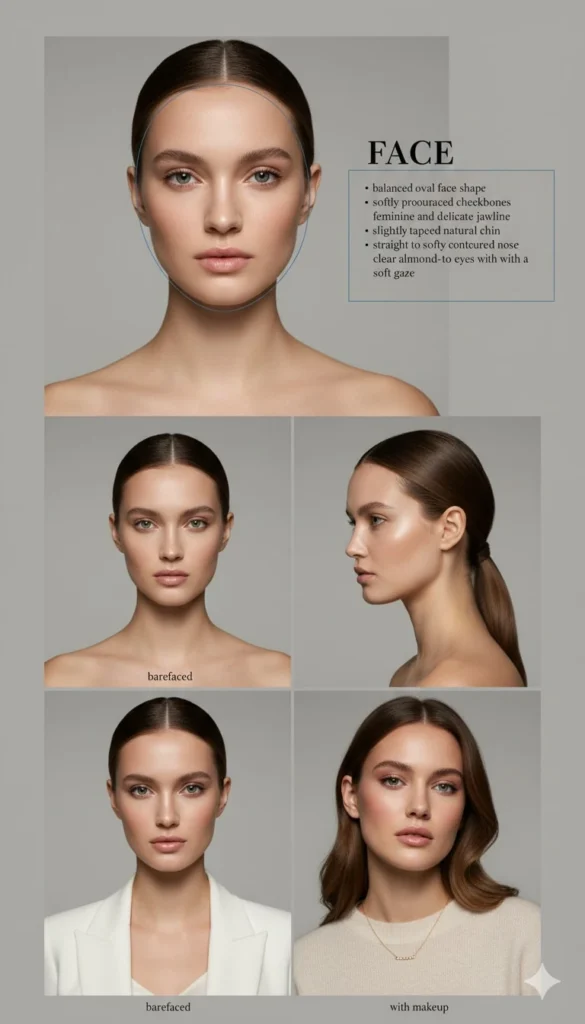
Prompt
{
"prompt": "A minimalist editorial beauty analysis board featuring a European female model with a balanced oval-to-heart face shape and a softly defined jawline. Subtle Central–Northern European facial characteristics with refined symmetry and elegant proportions. Neutral gray background, clean studio lighting, high realism.\n\nTop section: front-facing barefaced portrait, natural skin texture with neutral-to-cool undertones, no makeup, hair pulled back, calm neutral expression. A thin blue outline tracing the face shape.\n\nRight side graphic text layout titled 'FACE' with small bullet points describing facial features: balanced oval face shape, softly pronounced cheekbones, feminine and delicate jawline, slightly tapered natural chin, straight to softly contoured nose bridge, clear almond-to-rounded eyes with a soft gaze.\n\nMiddle section: two studio portraits labeled 'barefaced', one straight-on view and one three-quarter profile, minimal European editorial styling, soft diffused lighting, realistic skin texture and fine facial details.\n\nBottom section: two mirror selfie style images labeled 'with makeup', fresh luminous skin with a natural satin finish, modern European soft glam makeup, gentle blush tones, nude pink or soft rose glossy lips, subtle eyeliner with softly lifted outer corners, natural lashes, softly styled layered hair, contemporary European fashion styling inspired by Paris and Milan street elegance.\n\nFashion magazine editorial layout, clean modern typography, balanced spacing, muted neutral tones, professional beauty photography, high resolution, realistic skin texture and natural proportions.",
"negative_prompt": "exaggerated makeup, heavy contour, harsh shadows, cartoon style, anime, distorted facial proportions, overly sharp jawline, low resolution, oversaturated colors, messy layout, watermark, logo, text artifacts, duplicated faces, extra limbs",
"style": "editorial beauty photography",
"quality": "high",
"lighting": "soft studio lighting",
"background": "neutral gray"
}
How to Use This AI Image Prompt
- Click Copy Prompt above to copy the full prompt text
- Open your preferred AI image generator
- Paste the prompt and adjust any variables to your needs
- Generate and iterate — try modifying keywords for different results
Or use Vidzy to generate AI images with one tap — no prompt editing needed. Download free on the App Store.
Tips for Better AI Image Results
- Be specific: Add details about lighting, camera angle, style, and mood for more accurate AI output.
- Iterate: Generate multiple versions and pick the best one. Small wording changes can produce very different results.
- Combine ideas: Mix elements from different prompts in our free prompt library to create unique compositions.
- Match the model: Different AI models interpret prompts differently. Try the same prompt across multiple tools to compare results.
Frequently Asked Questions
Can I modify this prompt?
Absolutely. This prompt is a starting point. Feel free to change subjects, styles, lighting, or any other details to match your creative vision.
What AI tool works best with this prompt?
This prompt works with most AI image generators including Flux, Nano Banana 2, Midjourney, and DALL-E.
Is this prompt free to use?
Yes, all prompts in the Vidzy library are free to copy and use for personal and commercial projects.

Your Next Video Is 30 Seconds Away
Download Vidzy free, pick a template, and create your first video right now.
