

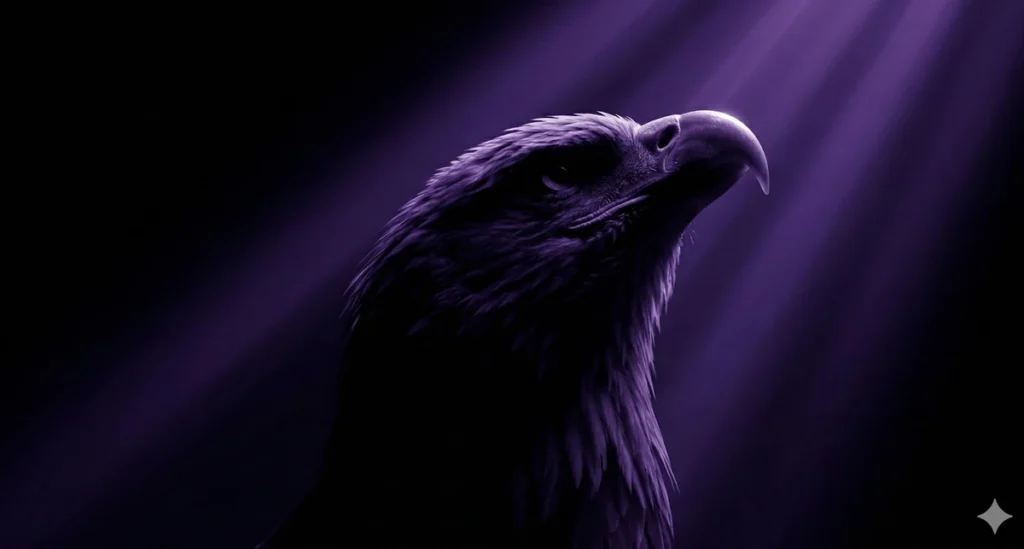
Majestic Bald Eagle 3D Render Prompt
Prompt
{
"subject": {
"description": "The head and upper neck of a bald eagle, looking upwards towards a light source.",
"count": 1,
"orientation": "profile, facing left, tilted steeply upward",
"pose_or_state": "static, neck extended and head looking up",
"expression": "majestic, neutral"
},
"scale_and_proportion": {
"subject_to_frame_ratio": "subject occupies approximately 40% of the frame, positioned in the center-right",
"proportions": "anatomically accurate eagle head",
"negative_space": "extensive negative space on the left and bottom of the frame"
},
"composition": {
"shot_type": "close-up",
"camera_angle": "low angle, looking up at the subject",
"framing": "subject positioned in the right half of the frame",
"symmetry": "highly asymmetrical",
"background": "pitch black with prominent diagonal volumetric light rays",
"depth_of_field": "deep, light rays and illuminated subject features are in sharp focus"
},
"temporal_context": {
"era": "contemporary digital art",
"modern_elements": false,
"retro_stylization": false,
"trend_influence": false
},
"style": {
"visual_type": "3D render",
"realism_level": "maximum texture realism",
"art_style": "none",
"stylization": false,
"interpretation": "literal reproduction only"
},
"lighting": {
"setup_type": "volumetric / rim lighting",
"light_direction": "top right, casting rays downwards toward the bottom left",
"light_quality": "hard volumetric beams (god rays)",
"contrast": "extremely high, chiaroscuro effect",
"shadow_behavior": "deep, absolute black shadows obscuring the lower half of the subject",
"color_temperature": "very cool, monochromatic deep violet/purple",
"lighting_variation": "none"
},
"materials": {
"primary_materials": [
"feathers",
"keratin (beak)"
],
"surface_finish": "matte feathers, semi-gloss beak",
"light_reflection": "sharp glint on the upper curve of the beak, soft highlights on individual feather edges",
"material_accuracy": "exact"
},
"color_palette": {
"dominant_colors": [
"Deep Purple (#32174d)",
"Black (#000000)"
],
"saturation": "high saturation in the purple light beams",
"contrast_level": "maximum",
"color_shift": false
},
"texture_and_detail": {
"surface_detail": "fine feather barbs and textures visible only where the light hits",
"grain_noise": "none, perfectly clean digital render",
"micro_details": "preserved beak texture and sharp edges of highlighted feathers",
"sharpness": "sharp focus on the beak and top of the head"
},
"camera_render_settings": {
"lens_equivalent": "50mm",
"perspective_distortion": "none",
"aperture_look": "f/8 (deep focus)",
"resolution": "high",
"render_quality": "clean and neutral"
},
"constraints": {
"no_additional_objects": true,
"no_reframing": true,
"no_crop": true,
"no_stylization": true,
"no_artistic_license": true,
"no_text": true,
"no_watermark": true,
"no_effects": true,
"no_dramatic_lighting": false,
"no_color_grading": true
},
"iteration_instruction": {
"compare_to_reference": true,
"fix_geometry_first": true,
"then_fix_composition": true,
"then_fix_lighting": true,
"then_fix_color": true,
"ignore_aesthetic_improvements": true
},
"negative_prompt": [
"creative",
"cinematic",
"artistic",
"stylized",
"illustration",
"abstract",
"dramatic",
"wide-angle",
"fisheye",
"exaggeration",
"reinterpretation",
"extra elements",
"modernized",
"retro look",
"color grading",
"AI artifacts",
"warm colors",
"visible background elements"
]
}
How to Use This AI Image Prompt
- Click Copy Prompt above to copy the full prompt text
- Open your preferred AI image generator
- Paste the prompt and adjust any variables to your needs
- Generate and iterate — try modifying keywords for different results
Or use Vidzy to generate AI images with one tap — no prompt editing needed. Download free on the App Store.
Tips for Better AI Image Results
- Be specific: Add details about lighting, camera angle, style, and mood for more accurate AI output.
- Iterate: Generate multiple versions and pick the best one. Small wording changes can produce very different results.
- Combine ideas: Mix elements from different prompts in our free prompt library to create unique compositions.
- Match the model: Different AI models interpret prompts differently. Try the same prompt across multiple tools to compare results.
Frequently Asked Questions
Can I modify this prompt?
Absolutely. This prompt is a starting point. Feel free to change subjects, styles, lighting, or any other details to match your creative vision.
What AI tool works best with this prompt?
This prompt works with most AI image generators including Flux, Nano Banana 2, Midjourney, and DALL-E.
Is this prompt free to use?
Yes, all prompts in the Vidzy library are free to copy and use for personal and commercial projects.

Your Next Video Is 30 Seconds Away
Download Vidzy free, pick a template, and create your first video right now.
