

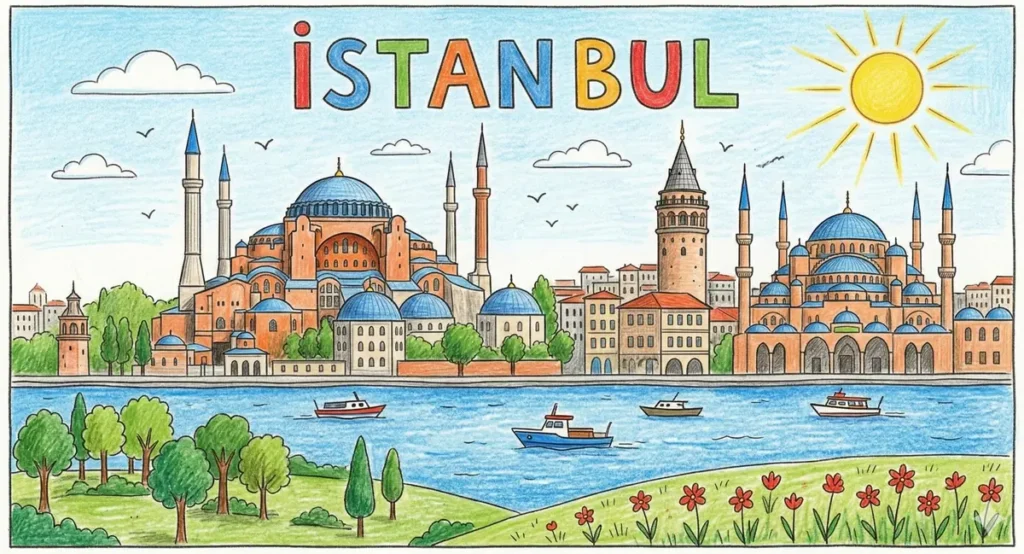
Illustrative Hand-Drawn Istanbul Skyline Prompt
Prompt
{
"subject": {
"description": "A hand-drawn, child-like illustration of Istanbul's skyline. The scene includes the Hagia Sophia and another mosque with blue domes and orange-terracotta walls, the Galata Tower, and a blue river (the Bosphorus) with three small boats. At the very top, the text 'İSTAN BUL' is written in large, multi-colored hand-lettered block characters.",
"count": 1,
"position_in_frame": "centered",
"orientation": "front-facing",
"expression_or_state": "static landscape drawing"
},
"composition": {
"shot_type": "wide shot",
"camera_angle": "eye-level perspective",
"framing": "tight and controlled within a square white border",
"symmetry": "asymmetrical but balanced",
"background": "Light blue sky with simple white clouds, a bright yellow sun with radiating rays in the upper right, and several small 'V' shaped bird silhouettes.",
"depth_of_field": "deep, everything is in sharp focus as per the drawing style"
},
"style": {
"visual_type": "illustration",
"realism_level": "literal reproduction of a hand-drawn style",
"art_style": "colored pencil and crayon drawing",
"interpretation": "literal, technical reproduction of the provided artwork"
},
"lighting": {
"light_type": "flat, uniform lighting from a bright sun",
"light_direction": "upper right",
"contrast": "medium",
"shadows": "soft, represented by simple pencil shading on building sides",
"color_temperature": "warm and cheerful"
},
"color_palette": {
"dominant_colors": [
"Sky Blue",
"Terracotta Orange",
"Leaf Green",
"Bright Red",
"Sun Yellow"
],
"saturation": "medium",
"overall_tone": "vibrant and natural for a child's drawing"
},
"texture_and_detail": {
"surface_quality": "textured with visible colored pencil strokes and paper grain",
"grain_noise": "subtle paper texture grain",
"detail_level": "high, including architectural windows, boat details, and flower patterns in the foreground",
"sharpness": "sharp, defined hand-drawn lines"
},
"camera_render_settings": {
"lens_equivalent": "n/a (flat illustration)",
"aperture_look": "n/a",
"resolution": "high resolution",
"render_quality": "clean and precise reproduction of the source art"
},
"constraints": {
"no_additional_objects": true,
"no_stylization": true,
"no_artistic_license": true,
"no_text": false,
"no_watermark": true,
"no_crop_or_reframe": true,
"no_color_shift": true,
"no_dramatic_effects": true
},
"negative_prompt": [
"photorealistic",
"3D render",
"cinematic",
"digital painting style",
"blurry",
"unstructured",
"omitting the text",
"changing the letter colors",
"modifying the building layout",
"dramatic lighting effects",
"wide-angle distortion"
]
}
How to Use This AI Image Prompt
- Click Copy Prompt above to copy the full prompt text
- Open your preferred AI image generator
- Paste the prompt and adjust any variables to your needs
- Generate and iterate — try modifying keywords for different results
Or use Vidzy to generate AI images with one tap — no prompt editing needed. Download free on the App Store.
Tips for Better AI Image Results
- Be specific: Add details about lighting, camera angle, style, and mood for more accurate AI output.
- Iterate: Generate multiple versions and pick the best one. Small wording changes can produce very different results.
- Combine ideas: Mix elements from different prompts in our free prompt library to create unique compositions.
- Match the model: Different AI models interpret prompts differently. Try the same prompt across multiple tools to compare results.
Frequently Asked Questions
Can I modify this prompt?
Absolutely. This prompt is a starting point. Feel free to change subjects, styles, lighting, or any other details to match your creative vision.
What AI tool works best with this prompt?
This prompt works with most AI image generators including Flux, Nano Banana 2, Midjourney, and DALL-E.
Is this prompt free to use?
Yes, all prompts in the Vidzy library are free to copy and use for personal and commercial projects.

Your Next Video Is 30 Seconds Away
Download Vidzy free, pick a template, and create your first video right now.
