

Football Player Introduction Poster Template
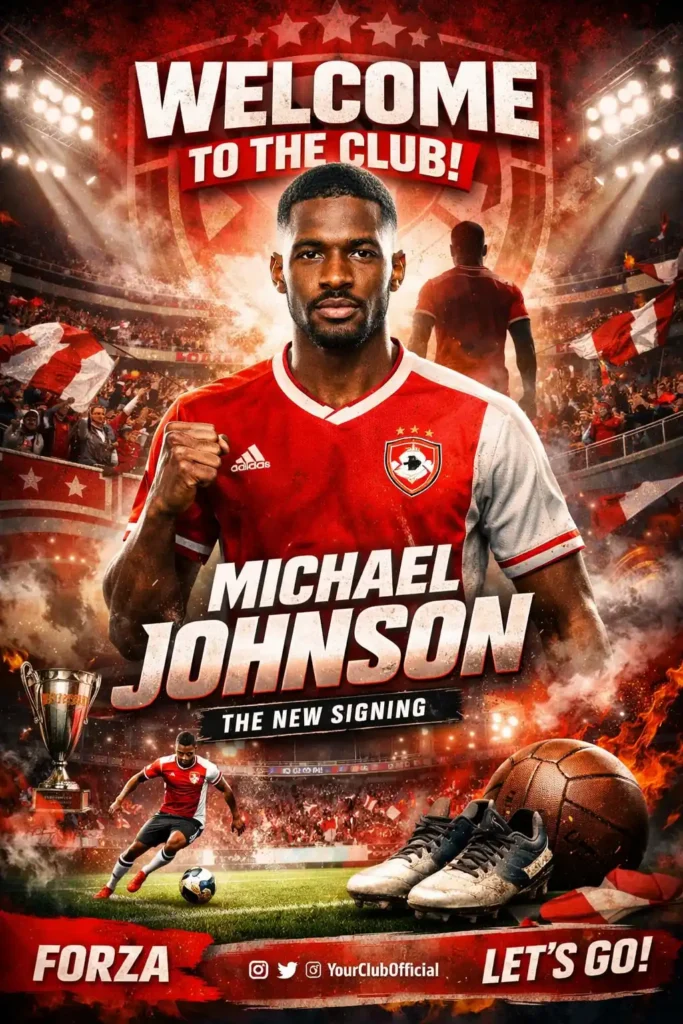
Prompt
Situation
You are creating a visual template for a football club to welcome and introduce a newly signed player. This poster will be displayed across the club's social media, stadium, and promotional materials to build excitement among fans and stakeholders about the new addition to the team. The poster serves as a formal introduction of the player to the club's community while simultaneously showcasing the club's identity and values.
Task
Design a football player introduction poster template that prominently features the player while incorporating the club's visual identity. The poster should communicate a warm welcome to the player, introduce them to the fanbase, and convey professionalism befitting a major sports announcement. The design must balance three key elements: player prominence, club branding, and a welcoming atmosphere.
Objective
Create a reusable template that clubs can easily customize with different player information, photos, and club branding while maintaining a cohesive, high-impact design that generates fan engagement and excitement around player signings. The poster should simultaneously welcome the player to the organization and introduce the player to the club's supporters.
Knowledge
The template should include designated spaces for:
Player photograph (full-body or headshot)
Player name and jersey number
Player position
Club logo and colors
A welcoming headline or tagline addressing the player (e.g., "Welcome to ${club_name}, ${player_name}")
Background design that reflects the club's aesthetic (stadium elements, club colors, dynamic patterns)
How to Use This AI Image Prompt
- Click Copy Prompt above to copy the full prompt text
- Open your preferred AI image generator
- Paste the prompt and adjust any variables to your needs
- Generate and iterate — try modifying keywords for different results
Or use Vidzy to generate AI images with one tap — no prompt editing needed. Download free on the App Store.
Tips for Better AI Image Results
- Be specific: Add details about lighting, camera angle, style, and mood for more accurate AI output.
- Iterate: Generate multiple versions and pick the best one. Small wording changes can produce very different results.
- Combine ideas: Mix elements from different prompts in our free prompt library to create unique compositions.
- Match the model: Different AI models interpret prompts differently. Try the same prompt across multiple tools to compare results.
Frequently Asked Questions
Can I modify this prompt?
Absolutely. This prompt is a starting point. Feel free to change subjects, styles, lighting, or any other details to match your creative vision.
What AI tool works best with this prompt?
This prompt works with most AI image generators including Flux, Nano Banana 2, Midjourney, and DALL-E.
Is this prompt free to use?
Yes, all prompts in the Vidzy library are free to copy and use for personal and commercial projects.

Your Next Video Is 30 Seconds Away
Download Vidzy free, pick a template, and create your first video right now.
