

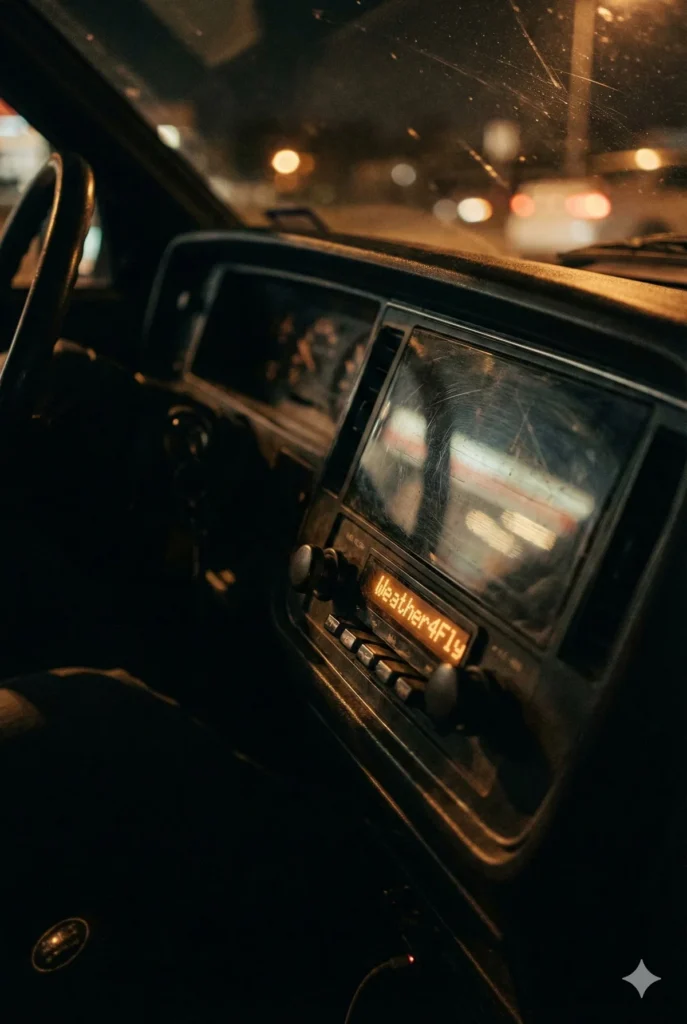
Cinematic Vertical Portrait of Vintage Car Radio at Night
Prompt
Create a high-resolution *VERTICAL (portrait)* photograph of a vintage car radio screen at night. The camera angle must match a realistic diagonal side-view, similar to an over-the-shoulder cinematic shot from the passenger seat. Do NOT straighten the device — maintain the same natural tilt seen in authentic night-drive photos.
TEXT ON THE LED DISPLAY (amber pixel font):
Weather4Fly
STYLE & LIGHTING:
– Warm orange LED glow, soft bloom around each segmented character.
– Dark car interior with minimal ambient light.
– Deep shadows, shallow depth of field, soft bokeh highlights.
– Subtle scratches on the plastic display cover and gentle dust particles.
– High contrast, moody, cinematic night-drive aesthetic.
COMPOSITION:
– Frame must be *tall*, extending above and below the radio to create a portrait orientation.
– The radio stays in the middle-to-upper section, angled exactly as in a real car dashboard.
– Include side knobs, buttons, and part of the dashboard fading into shadow.
– Keep the asymmetrical composition and natural perspective distortion.
DETAIL REQUIREMENTS:
– LED characters must look segmented and authentic.
– Slight reflections on the display surface.
– Warm tones only — no neon or artificial color shifts.
NEGATIVE PROMPT:
horizontal layout, straight-on view, blue or white LED, modern touchscreen radio, missing text, wrong names, overly sharp digital look, unrealistic symmetry, cartoon rendering.
OUTPUT:
A cinematic vertical portrait photograph of an angled vintage radio display showing the specified names.
How to Use This AI Image Prompt
- Click Copy Prompt above to copy the full prompt text
- Open your preferred AI image generator
- Paste the prompt and adjust any variables to your needs
- Generate and iterate — try modifying keywords for different results
Or use Vidzy to generate AI images with one tap — no prompt editing needed. Download free on the App Store.
Tips for Better AI Image Results
- Be specific: Add details about lighting, camera angle, style, and mood for more accurate AI output.
- Iterate: Generate multiple versions and pick the best one. Small wording changes can produce very different results.
- Combine ideas: Mix elements from different prompts in our free prompt library to create unique compositions.
- Match the model: Different AI models interpret prompts differently. Try the same prompt across multiple tools to compare results.
Frequently Asked Questions
Can I modify this prompt?
Absolutely. This prompt is a starting point. Feel free to change subjects, styles, lighting, or any other details to match your creative vision.
What AI tool works best with this prompt?
This prompt works with most AI image generators including Flux, Nano Banana 2, Midjourney, and DALL-E.
Is this prompt free to use?
Yes, all prompts in the Vidzy library are free to copy and use for personal and commercial projects.

Your Next Video Is 30 Seconds Away
Download Vidzy free, pick a template, and create your first video right now.
