

A night in paris
Prompt
{
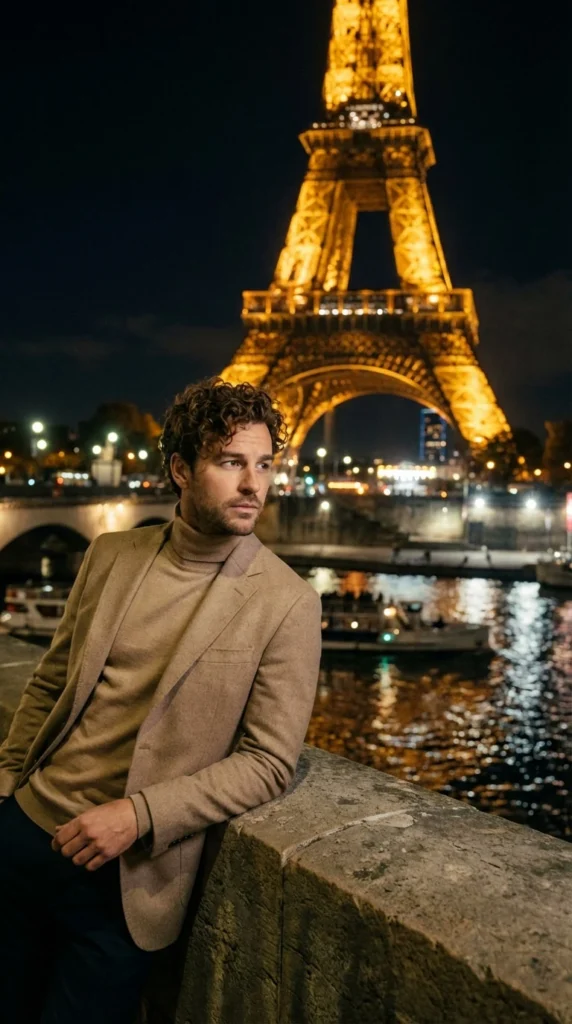
"subject_and_scene": {
"main_subject": "A young man with thick curly brown hair, wearing a sophisticated beige turtleneck sweater and a matching tailored wool blazer, displaying a contemplative and moody expression.",
"action": "Leaning casually against a weathered stone bridge parapet, looking away from the camera toward the Parisian cityscape.",
"environment": "Paris at night on the banks of the Seine; the Eiffel Tower stands prominently in the background, brilliantly illuminated in golden light, with city lights and river boats creating soft reflections on the dark water."
},
"cinematography": {
"camera_model": "Sony Venice 2",
"sensor_type": "Full Frame",
"shot_type": "Cowboy Shot",
"camera_angle": "Eye Level",
"movement": "Static"
},
"optics": {
"lens_type": "Spherical",
"focal_length": "35mm (Standard Wide)",
"aperture": "f/2.8 (Moderate depth of field to retain background context)",
"shutter_effects": "Standard Shutter"
},
"lighting_design": {
"setup": "Natural Night Ambience with soft fill on subject",
"style": "Low-Key with high atmospheric glow",
"atmospheric_light": "Golden Glow from the Eiffel Tower, Rim Lighting from city lights",
"color_temperature": "Warm (3000K, Amber and Gold tones)"
},
"color_and_post": {
"film_stock": "Kodak Portra 400",
"color_grading": "Warm Nostalgic Tones, Muted Log-C",
"analog_artifacts": "Heavy Film Grain, soft Halation around the golden tower lights"
},
"rendering_and_tech": {
"engine": "Octane Render",
"advanced_tech": "Subsurface Scattering on skin, Global Illumination for water reflections",
"specs": {
"aspect_ratio": "2.39:1 (CinemaScope)",
"resolution": "8K, Photorealistic, Hyper-detailed"
}
},
"directorial_style": "Denis Villeneuve (Atmospheric mood and pensive composition)"
}
How to Use This AI Image Prompt
- Click Copy Prompt above to copy the full prompt text
- Open your preferred AI image generator (Nano Banana 2 recommended)
- Paste the prompt and adjust any variables to your needs
- Generate and iterate — try modifying keywords for different results
Or use Vidzy to generate AI images with one tap — no prompt editing needed. Download free on the App Store.
Tips for Better AI Image Results
- Be specific: Add details about lighting, camera angle, style, and mood for more accurate AI output.
- Iterate: Generate multiple versions and pick the best one. Small wording changes can produce very different results.
- Combine ideas: Mix elements from different prompts in our free prompt library to create unique compositions.
- Match the model: Different AI models interpret prompts differently. This prompt is optimized for Nano Banana 2.
Frequently Asked Questions
Can I modify this prompt?
Absolutely. This prompt is a starting point. Feel free to change subjects, styles, lighting, or any other details to match your creative vision.
What AI tool works best with this prompt?
This prompt is optimized for Nano Banana 2, but it works well with most modern AI IMAGE generators.
Is this prompt free to use?
Yes, all prompts in the Vidzy library are free to copy and use for personal and commercial projects.

Your Next Video Is 30 Seconds Away
Download Vidzy free, pick a template, and create your first video right now.
