

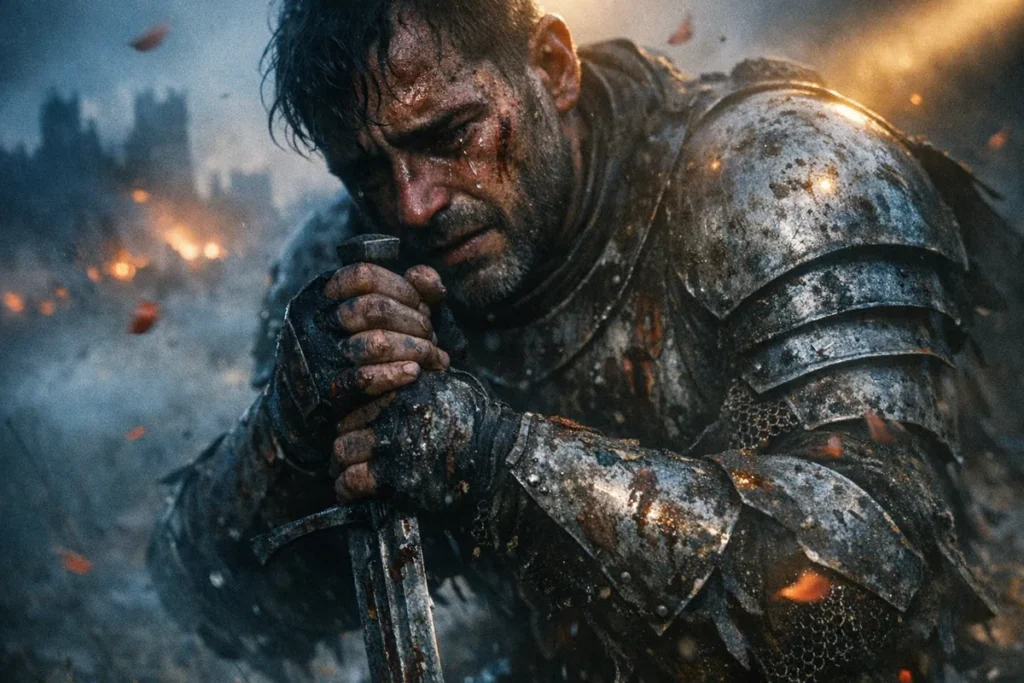
A broken, soul-crushed medieval knight
Prompt
{
"subject_and_scene": {
"main_subject": "A broken, soul-crushed medieval knight kneeling in defeat, his eyes glazed with tears and trauma; his shattered armor is caked in dried mud and fresh blood. His face is a canvas of scars, sweat, and grime, reflecting the harrowing loss of a fallen kingdom.",
"action": "Gripping his sword's hilt with trembling hands as if it's the only thing keeping him from collapsing; his chest heaving in rhythmic, heavy gasps of despair.",
"environment": "A desolate, windswept battlefield at the edge of an ancient forest; a hazy, ethereal fog rolls over the ground, partially obscuring the distant, smoldering ruins of a castle. Petals or embers are caught in the wind, drifting past his face."
},
"cinematography": {
"camera_model": "Sony Venice 2",
"sensor_type": "Full Frame",
"shot_type": "Medium Close-Up (Vertical composition focusing on the knight's torso and face, but keeping his kneeling posture visible)",
"camera_angle": "Low Angle (Slightly tilted Dutch Angle to evoke a sense of psychological instability and sorrow)",
"movement": "Slow 'Dolly In' combined with a 'Snorricam' effect to make the knight's struggle feel claustrophobic and intensely personal"
},
"optics": {
"lens_type": "Anamorphic (to create emotional 'dream-like' fall-off and dramatic flares)",
"focal_length": "50mm (providing a natural but emotionally focused perspective)",
"aperture": "f/1.4 (Extremely shallow depth of field, blurring everything but his tear-filled eyes)",
"shutter_effects": "180-degree shutter for natural motion blur on the wind-blown debris, emphasizing the 'slow-motion' feeling of grief"
},
"lighting_design": {
"setup": "Split Lighting to hide half of his face in darkness, symbolizing his internal conflict and loss",
"style": "Low-Key with high emotional contrast",
"atmospheric_light": "Blue Hour fading into darkness, with a single warm 'God Ray' piercing through the clouds to highlight his face like a spotlight",
"color_temperature": "Ice-cold Blue tones for the environment, contrasting with the Warm, flickering orange light from distant fires"
},
"color_and_post": {
"film_stock": "Kodak Portra 160 (Pulled 1 stop for lower contrast and softer, more melancholic skin tones)",
"color_grading": "Bleach Bypass (Desaturated colors, heavy blacks, emphasizing the grittiness and sorrow)",
"analog_artifacts": "Heavy Halation around the highlights and subtle 'Gate Weave' to mimic a vintage 35mm war film aesthetic"
},
"rendering_and_tech": {
"engine": "Octane Render",
"advanced_tech": "Highly detailed skin pore texture with Ray Traced tear droplets and wet blood reflections",
"specs": {
"aspect_ratio": "9:16 (Vertical Cinema)",
"resolution": "8K Photorealistic"
}
},
"directorial_style": "Denis Villeneuve (Atmospheric haze and overwhelming silence) mixed with Mel Gibson (Gritty, visceral realism of war)"
}
How to Use This AI Image Prompt
- Click Copy Prompt above to copy the full prompt text
- Open your preferred AI image generator
- Paste the prompt and adjust any variables to your needs
- Generate and iterate — try modifying keywords for different results
Or use Vidzy to generate AI images with one tap — no prompt editing needed. Download free on the App Store.
Tips for Better AI Image Results
- Be specific: Add details about lighting, camera angle, style, and mood for more accurate AI output.
- Iterate: Generate multiple versions and pick the best one. Small wording changes can produce very different results.
- Combine ideas: Mix elements from different prompts in our free prompt library to create unique compositions.
- Match the model: Different AI models interpret prompts differently. Try the same prompt across multiple tools to compare results.
Frequently Asked Questions
Can I modify this prompt?
Absolutely. This prompt is a starting point. Feel free to change subjects, styles, lighting, or any other details to match your creative vision.
What AI tool works best with this prompt?
This prompt works with most AI image generators including Flux, Nano Banana 2, Midjourney, and DALL-E.
Is this prompt free to use?
Yes, all prompts in the Vidzy library are free to copy and use for personal and commercial projects.

Your Next Video Is 30 Seconds Away
Download Vidzy free, pick a template, and create your first video right now.
